In the realm of project management, teams often find themselves weighing their options between powerful tools to enhance productivity and facilitate collaboration. With a plethora of options available, “monday com vs basecamp” emerges as a critical topic for teams looking to optimize their workflows. This guide aims to provide a comprehensive comparison between these two giants in project management, allowing you to make an informed decision that aligns with your team’s needs.


As businesses grow, so do their project management needs. The choice between different project management tools largely depends on team dynamics, project complexity, and specific requirements. Monday.com and Basecamp are widely known for their user-centric designs and unique features.
Monday.com is a versatile work operating system that offers customizable workflows, enabling teams to plan, track, and manage projects effectively. On the other hand, Basecamp provides a straightforward approach to project management with an emphasis on team collaboration, real-time communication, and simplicity.
In this section, we’ll delve into an in-depth comparison of both platforms, evaluating their key benefits and how they can cater to various business needs.
Overview of Monday.com
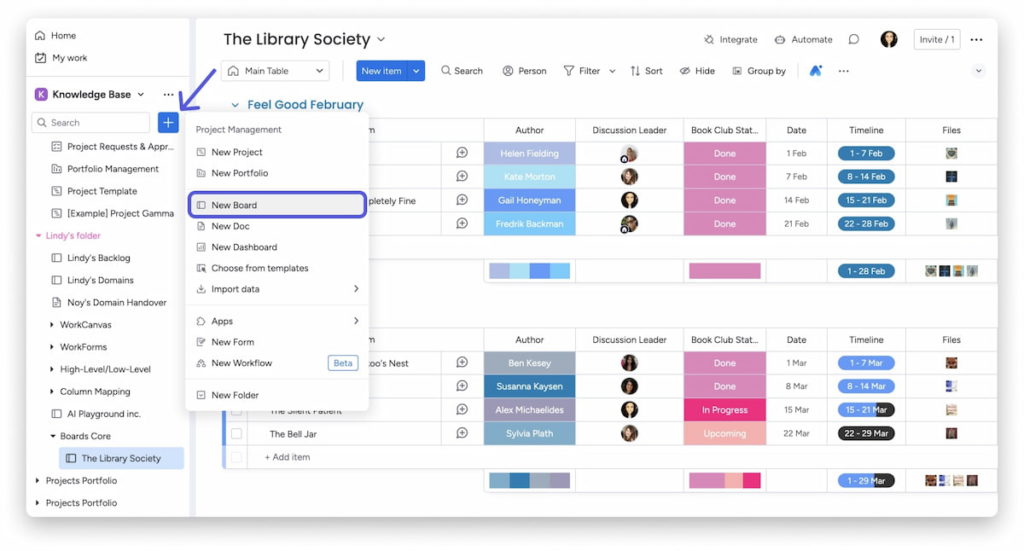
Monday.com is known for its visual and intuitive design that makes project management engaging. The platform operates on the idea of a work operating system (Work OS), allowing users to tailor dashboards to their specific requirements.
The structure is based on boards that can be customized with different columns to track progress, assign tasks, set deadlines, and more. Users can create their boards from scratch or choose from a range of pre-built templates to get started quickly.
Versatility and Customization
One of Monday.com’s strongest points is its incredible versatility. Teams can customize boards to fit their working style with ease, making it suitable across various industries. This adaptability provides companies the ability to modify workflows based on projects, deadlines, or specific tasks.
For example, if a marketing team needs to manage a campaign project, they can tailor the board to track leads, manage tasks between members, and input specific metrics for the project, all within the same visual framework.
Visual Project Tracking
Another appealing characteristic of Monday.com is its visual tracking capabilities. The platform’s vibrant color coding and charting options create a dynamic overview of project progress. Users can employ timeline, Gantt, Kanban, and calendar views to monitor ongoing projects.
The visual representation allows team members to understand the workload distribution and project status instantly. This can lead to improved communication and transparency within the team, fostering a more collaborative work environment.
Overview of Basecamp
Basecamp takes a more minimalist approach to project management, prioritizing communication and simplicity over extensive features. It’s designed for teams that want to focus on getting things done without the fluff.
The platform is based on a straightforward layout that organizes projects into folders containing discussions, to-do lists, file sharing, and schedules. Basecamp functions as a central hub for every aspect of a project, simplifying collaboration among team members.
Simplified Communication and Collaboration
Basecamp’s primary focus is on enhancing communication. With built-in messaging and threaded conversations, team members can easily stay in touch and share updates. This prevents feedback from getting lost in email threads and keeps team discussions streamlined and accessible.
The notifications system in Basecamp ensures that team members are kept in the loop without being overwhelmed. This unobtrusive approach to project management allows users to concentrate on their tasks while still being aware of essential updates.
Task Management Made Simple
Another strong aspect of Basecamp lies in its task management features. It incorporates to-do lists that are easy to navigate. Users can break down larger projects into smaller tasks, assign them to team members, and set due dates.
The simplicity goes hand-in-hand with its visual layout, allowing for quick updates on what has been accomplished and what still needs to be done. This clear representation of tasks can help teams stay aware of deadlines and maintain accountability efficiently.
Key Features and Functionality: Monday.com and Basecamp Compared
When it comes to robust functionality, both Monday.com and Basecamp offer an array of features designed to enhance productivity. However, the focus and implementation of those features differ considerably.
In this section, we’ll dissect the key functionalities that characterize each platform, allowing teams to identify which is better suited for their workflow.
Task and Project Management Features
Both platforms shine in project and task management, but they adopt different methodologies.
Monday.com Task Management
Monday.com’s task management features are centered around boards that can be compared to spreadsheets. Each task can be customized with various parameters, including priority levels, statuses, deadlines, and assignees.
Users can create sub-tasks, allowing for even greater detail and organization. The ability to assign tasks and track progress visually is a significant boon for teams wishing to see how projects are progressing at a glance.
Additionally, the automation options provided in Monday.com enable users to set up recurring tasks, reminders, and automate processes that can save significant time.
Basecamp Task Management
Conversely, Basecamp keeps task management simple and straightforward, focusing primarily on to-do lists. Users can create and manage lists tailored to project requirements, bringing a sense of organization without over-complication.
The emphasis on simplicity means that while Basecamp may not offer the extensive customization offered by Monday.com, it delivers a user-friendly interface that minimizes the learning curve for new users.
Tying tasks to discussions and messages enhances the level of collaboration among team members, making updates seamless.
Collaboration Tools
Collaboration remains a cornerstone of any successful project management platform, and both tools have developed unique ways to enhance team interaction.
Collaboration in Monday.com
In Monday.com, collaboration is built into the fabric of its design. Each board supports comments and updates, allowing team members to share insights and feedback directly on tasks. This promotes accountability and encourages open dialogue without relying heavily on external communication tools.
Furthermore, integrations with popular chat applications and collaborative tools enhance the collaboration capabilities of Monday.com. Team members can discuss projects in real-time, ensuring that everyone is aligned with objectives.
Collaboration in Basecamp
Basecamp keeps collaboration seamless and intuitive with its message boards, which allow team members to discuss ongoing projects efficiently. The platform serves as a repository for all conversations, documents, and files related to specific projects, leading to better information retrieval.
Document sharing is another area where Basecamp excels. Users can store files centrally, making it easier for teams to share important information about the project without worrying about outdated files lingering in email threads.
Reporting and Analytics
Data-driven decision-making is essential in project management, and both platforms address this need differently.
Reporting in Monday.com
Monday.com offers users advanced reporting and analytics features, enabling teams to generate customizable reports that detail project performance, resource allocation, and timelines. This aspect of the platform allows for thorough tracking of KPIs and milestones, providing valuable insights into team productivity.
Dashboards can be tailored to show specific metrics that matter most to a team, enhancing the ability to monitor project health and adjust strategies as necessary.
Reporting in Basecamp
In contrast, Basecamp takes a more relaxed approach to reporting. It doesn’t provide the same level of detailed analytics as Monday.com, focusing instead on providing a clear overview of project status.
The simplicity of Basecamp’s reporting means that while it may lack in-depth metrics, it allows teams to easily identify which tasks are completed and which are outstanding, promoting accountability without overwhelming managers with data.
Pricing and Plans: Which Project Management Tool Offers the Best Value?
Budget considerations are always paramount when selecting a project management tool. Understanding the pricing plans of Monday.com and Basecamp can help identify which tool provides the best return on investment based on the functionality required.
Pricing Structure of Monday.com
Monday.com operates on a subscription-based model, offering tiered pricing to accommodate various business sizes and needs.
Basic Plan
For smaller teams or those just starting, Monday.com’s Basic plan provides essential features like unlimited boards, over 200 templates, and a variety of views at a competitive rate. This entry-level plan serves as an excellent way for teams to explore the platform without breaking the bank.
Standard Pro Plans
As teams grow, they may benefit from the Standard or Pro plans, which introduce advanced features like timeline views, time tracking, and integrations with third-party apps. These plans are well-suited for organizations that require a higher level of functionality and enhanced collaboration options.
Enterprise Plan
For large organizations or those that need highly customized solutions, the Enterprise plan offers tailored features, extensive integrations, advanced security, and user permissions. This plan allows businesses to scale their use of Monday.com as needed.
Pricing Structure of Basecamp
Basecamp takes a unique approach to pricing, opting for a flat-rate subscription model that serves unlimited users which is particularly appealing for businesses with larger teams.
Basecamp Business
Basecamp’s business plan provides access to all features at a reasonable fixed price, ensuring teams of any size can benefit from what Basecamp has to offer. Businesses can bring all members of the team on board without worrying about incremental costs as they scale in size.
This predictable pricing structure can be a significant advantage for organizations that want to manage their finances without worrying about fluctuating project management tool costs.
User Interface and Experience: Navigating Monday.com and Basecamp
A user-friendly interface can make all the difference in how teams interact with project management software.
User Interface of Monday.com
Monday.com’s interface offers a visually appealing experience filled with vibrant menus and customizable dashboards. This intuitive layout can enhance user engagement, as team members can personalize their workspaces to align best with their workflows.
Dashboard Customization
The ability to create tailored dashboards allows users to achieve a customized workspace that meets their unique needs. Users can position tracking elements, timelines, and workload distributions according to personal preference, enhancing user satisfaction.
Learning Curve
While the extensive features are beneficial, they also introduce a steeper learning curve for new users. However, Monday.com does offer a relatively beginner-friendly onboarding process and extensive resources, including tutorials and webinars, to help users acclimate.
User Interface of Basecamp
Basecamp’s interface is built around minimalism and ease of use. The clean layout promotes straightforward navigation, making it simple for teams to access ongoing projects and updates without distractions.
Project Overview
Users will find a clear project overview that allows for efficient navigation between projects and tasks. This feature minimizes the time spent searching through menus, allowing team members to focus more on their work.
Learning Curve
The learning curve for Basecamp is less steep, as its simplicity means teams can jump in and begin collaborating immediately. New users can quickly grasp essential elements without the frustration often associated with more feature-heavy platforms.
Collaboration and Communication: How Monday.com and Basecamp Facilitate Teamwork
Effective collaboration and communication are the backbone of successful projects. Both Monday.com and Basecamp provide tools that enhance teamwork and connectivity.
Collaboration Tools in Monday.com
Monday.com is designed with collaboration at its core, incorporating robust features to ensure teams can communicate effectively.
In-depth Task Comments and Updates
In Monday.com, team members can leave comments directly on task items, facilitating a fluid exchange of ideas and feedback. This feature minimizes the need for separate communication platforms, as team discussions can occur precisely where the work is taking place.
Integration with Communication Apps
Additionally, the variety of integration options with tools like Slack allows for real-time communication, ensuring that team members are informed at all times. Notifications can be customized to fit individual preferences, optimizing engagement without causing distractions.
Collaboration Tools in Basecamp
Basecamp thrives on facilitating collaboration with built-in messaging and discussion boards that bring team members together effortlessly.
Centralized Communication
The centralization of communication promotes transparency across the team, allowing everyone to see project discussions and updates in one place. This reduces confusion and streamlines collaboration as team members can quickly access relevant information without sifting through emails.
Automatic Check-ins
With Basecamp’s automatic check-in feature, team leaders can gather progress updates from team members regularly, enabling a sense of accountability and ongoing communication without micromanaging.
Integrations and Compatibility: Extending the Functionality of Monday.com and Basecamp
Integrating with other tools can create a seamless workflow that enhances productivity across teams. Let’s look at the integration capabilities of both platforms.
Integrations Available with Monday.com
Monday.com stands out when it comes to integration options. It supports a wide array of third-party applications, allowing users to extend the platform’s functionality.
Popular Integrations
Some of the most popular integrations include Google Drive, Slack, Trello, and Zapier. These integrations allow teams to import and synchronize data seamlessly with the tools they already use, providing a comprehensive solution for project management.
Custom API
For businesses with unique needs, Monday.com offers a custom API integration that enables organizations to build tailored connections between Monday.com and other applications. This level of flexibility can be particularly beneficial for organizations with specialized processes.
Integrations Available with Basecamp
Basecamp offers a more limited selection of integrations primarily focused on collaboration and file sharing.
Essential Integrations
Industries relying on their existing tools may find Basecamp’s standard integrations practical but less comprehensive when compared to Monday.com. However, popular tools like Zapier can help bridge that gap, automating processes and enhancing overall functionality.
Emphasis on Simplicity
Basecamp’s philosophy leans towards simplicity, meaning that while it may not provide an extensive list of integrations, it still captures the essence of interoperability without over-complicating the user experience.
Strengths and Weaknesses: Analyzing the Pros and Cons of Each Platform
Before making a final decision, it’s crucial to analyze the strengths and weaknesses of both Monday.com and Basecamp.
Strengths of Monday.com
- Customization and Versatility: Monday.com’s extensive customization capabilities make it suitable for various industries and project types.
- Visual Tracking: The visual appeal and ease of use in tracking progress enhance project oversight and accountability.
- Robust Integrations: A wide array of integrations with other tools allows teams to streamline workflows and reduce redundancies.
Weaknesses of Monday.com
- Steeper Learning Curve: With its extensive features, new users may face challenges during the onboarding process.
- Pricing for Larger Teams: As teams grow, the subscription costs can become a significant factor, particularly for small to mid-sized businesses.
Strengths of Basecamp
- Simplicity and User-Friendly Interface: Basecamp’s straightforward setup allows teams to navigate efficiently, promoting collaboration without complexity.
- All-In-One Solution: With built-in message boards, to-do lists, and file sharing, teams can maintain effective communication within a single platform.
- Flat-Rate Pricing: Basecamp’s pricing model allows organizations to bring unlimited users onboard without incurring additional costs.
Weaknesses of Basecamp
- Limited Customization: Compared to Monday.com, Basecamp lacks extensive customization options, which may frustrate teams looking for specific functionalities.
- Less Comprehensive Reporting Features: The absence of in-depth analytics may hinder data-driven decision-making for some organizations.
Use Case Scenarios: Determining the Best Fit for Your Business Needs
The choice between Monday.com and Basecamp often hinges on the specific needs of a team or organization. Understanding different use cases can help clarify which tool is the better fit.
When to Choose Monday.com
- For Large Teams with Diverse Projects: If you manage a large team across multiple projects, Monday.com’s versatility allows for tailored dashboards and workflows that accommodate various needs.
- If Customization is Key: Organizations seeking to customize every aspect of their project management to fit their workflows would benefit from Monday.com’s capabilities.
- For Companies Focused on Reporting: If tracking project progress and analyzing KPIs is crucial for your team, Monday.com’s reporting features can provide the necessary insights.
When to Choose Basecamp
- For Smaller Teams Seeking Simplicity: Basecamp is well-suited for smaller teams that want a straightforward, no-frills approach to project management.
- If Collaboration is Your Priority: Basecamp’s focus on communication and collaboration without excessive features makes it ideal for teams that need a highly cooperative environment.
- When Budget is a Concern: If managing costs is a key consideration, Basecamp’s flat-rate pricing can accommodate larger teams without additional expenses.
Conclusion
Choosing between Monday.com and Basecamp ultimately hinges on your organization’s specific requirements, budget constraints, and desired functionality. Monday.com shines with its extensive customization options, visual tracking capabilities, and robust integrations, catering to diverse project needs and larger teams. Conversely, Basecamp offers simplicity, effective communication tools, and a flat-rate pricing model that suits smaller teams or businesses prioritizing straightforward collaboration. Understanding your team dynamics and project complexity will guide you in making the right decision between these two exceptional project management platforms.
FAQs for Monday.com vs. Basecamp
What are the main features of Monday.com?
Monday.com is known for its customizable workflows, visual project management tools, and automation capabilities. It offers features like Gantt charts, Kanban boards, and time tracking, allowing teams to tailor their projects according to their needs.
What are the main features of Basecamp?
Basecamp focuses on simplicity and collaboration. Key features include to-do lists, file sharing, group chat, and a centralized message board. It’s designed to keep all project-related communication in one place for ease of access.
Which platform is better for larger teams?
Monday.com tends to be more suitable for larger teams due to its extensive customization options and scalability. It allows various teams within larger organizations to have tailored boards and workflows suited to their specific needs.
Is Basecamp better for remote teams?
Basecamp is often favored by remote teams because of its emphasis on communication and collaboration tools. It provides a straightforward approach to keeping team members aligned, regardless of their location.
How do the pricing models compare?
Monday.com offers a tiered pricing model based on the features and number of users, while Basecamp typically offers a flat-rate pricing structure. Businesses should evaluate the size of their team and specific needs to determine which model is more cost-effective.
Can I integrate other tools with Monday.com or Basecamp?
Both platforms offer integration options. Monday.com supports a wider range of integrations with various tools, including CRM software and other project management tools. Basecamp also supports integrations but has fewer options available.
Which platform provides better customer support?
Monday.com is known for providing robust customer support options, including live chat and extensive documentation. Basecamp also has a solid support system, but users have reported that response times can vary.
Is either platform suitable for agile project management?
Yes, both Monday.com and Basecamp can be utilized for agile project management. Monday.com provides features like sprints and customizable workflows that cater well to agile methodologies, while Basecamp can be adapted for agile through its collaborative tools.
Can I try either Monday.com or Basecamp for free?
Yes, both platforms offer free trials, allowing users to explore their features before committing to a subscription. Monday.com offers a trial period for a limited time, while Basecamp has a 30-day free trial.
Which platform is easier to use for beginners?
Basecamp is often considered easier for beginners due to its straightforward interface and simplified tools. However, Monday.com offers a wealth of tutorials and resources that can help new users get oriented quickly.

